Jira automation limits: how usage is counted and how to stop wasting it
Jira automation usage is capped by plan, and Atlassian is changing how it is measured: from December 3, 2026, automation is metered in steps pooled across your organization instead of rule runs per product. How usage is counted, where to see it, and the rule patterns that burn the allowance.
Automation is metered. The rules that burn the allowance are usually the quiet ones nobody remembers creating.
Jira automation limits are monthly allowances tied to your plan, and the way Atlassian counts them is changing. Today Jira counts successful rule runs, per product: a run that performs at least one action counts once, however many actions it takes. From December 3, 2026, automation is metered in steps (each trigger, condition, action and branch that runs), pooled across your organization, with allowances per user on paid plans.
Both models reward the same habits: rules that fire only when they need to, stop early when there is nothing to do, and finish their work in one pass. Here is how each model counts, where to see your usage, and what to change first.
How are Jira automation limits counted today?
A rule run counts toward your monthly limit when it performs at least one successful action, and it counts once no matter how many actions it takes. Runs that a condition stops before any action, system rules that Atlassian creates, and housekeeping such as logging or creating a variable do not count. Each Jira product has its own limit, and Enterprise is unlimited.
That is the model Atlassian introduced in November 2023, summarized in its article on automation limits and usage. Scope does not change the count: single-space, multi-space and global rules all draw from the same monthly limit, and each tier above Free has a higher one.
The same article draws a distinction worth knowing. The monthly usage limit is one thing; service limits are another. Service limits cap what a single execution can do (how many work items a search returns, how much processing time your rules use, how many times rules can trigger each other before loop detection stops them), and upgrading your plan does not raise them.
What changes on December 3, 2026?
Atlassian announced on September 1, 2026 that automation moves to usage-based pricing measured in steps. Every trigger, condition, action and branch that runs is a step, loops count for every item, and allowances are pooled across your organization. Paid plans can run past the allowance and pay for the extra; Free plans stop.
The monthly allowances Atlassian publishes for Jira in its usage calculation article are:
| Jira plan | Automation steps per month |
|---|---|
| Free | 150 per subscription |
| Standard | 400 per user |
| Premium | 750 per user |
| Enterprise | 1,000 per user |
Other products have their own allowances, which add to the same organization pool. Rovo actions inside a rule draw on Rovo credits rather than steps. The price of extra steps is on Atlassian’s pricing pages; check it there rather than trusting a figure quoted in a blog.
Two consequences matter more than the table. First, Enterprise is no longer unlimited. Second, the size of a run now matters. Under rule runs, a rule that edited 200 work items in a branch counted once, the same as a rule that edited one. Under steps, every action inside the branch counts for every work item, so rules that were cheap as a single run can become the largest line on the meter.
Where can you see your automation usage?
In Jira, global automation has a Usage tab (open Settings, then System, then global automation) showing usage so far this month, your plan’s limit and projected end-of-month usage. You need the Administer Jira global permission. Performance insights for automation rules show which rules run most often, which is where a cleanup should start. In the newest version of the screen, rules are called flows, and a switch at the top shows either the current usage model or the upcoming one: automation steps and Rovo credits against the allowance, the date they reset, and the flows that use the most.
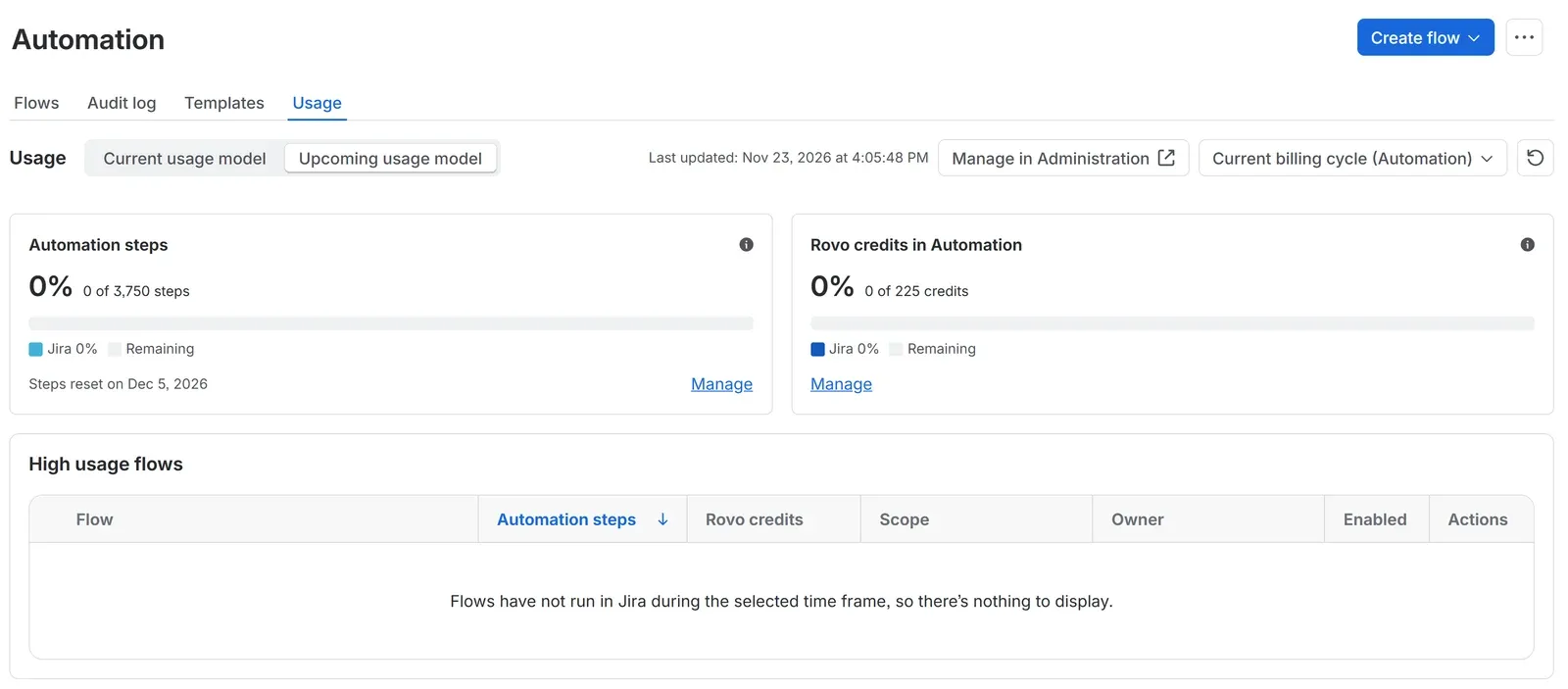
For the new meters, Atlassian has said organization admins get usage views and spending controls in Atlassian Administration. Its article on extra usage covers setting a monthly limit or turning extra usage off, and notes that admins are notified at 80% and 100% of the allowance. With extra usage off, metered features can stop until the next billing cycle, so decide which behavior you want before December.
Which rules burn the allowance?
Look for these patterns, roughly in order of cost:
- Broad triggers. “Work item updated” fires on every edit to every field. “Field value changed”, set to the one field the rule cares about, fires far less often.
- Global scope for a one-space job. A global rule sees events from every space. Scope it to the spaces that need it.
- Late or expensive conditions. A rule that does three lookups before checking whether the work item is even the right type pays for the lookups every time. Put simple comparisons first; a JQL condition costs more than a compare on a field.
- Busy scheduled rules. A rule that runs every hour over a JQL search returning the same work items each time does the same work again and again.
- One message per work item. Ten notifications for ten overdue items are ten sets of actions; one digest is one.
- Rules that trigger rules. A rule allowed to fire from another rule’s actions can multiply runs, and at worst ends in loop detection.
- Orphaned rules. Rules whose owner has left, or that act on spaces nobody uses, keep running anyway.
How do you cut automation waste?
- Start from the data. Open the Usage tab and performance insights, list the ten rules that run most, and work down that list. Most of the waste usually sits in a few rules.
- Narrow the trigger. Replace “Work item updated” with “Field value changed” wherever the rule only cares about one field.
- Narrow the scope. Move global rules to the spaces that need them.
- Reorder conditions. Cheapest and most selective first, so most runs stop at the first check.
- Make scheduled JQL return only work that needs changing. Exclude what the rule already handled, for example with
AND labels != escalated, and lower the frequency where an hour’s delay costs nothing. The JQL hygiene queries for admins show the style: searches that return only what needs attention. - Batch notifications. Look up the matching work items once and send one message that lists them, instead of one message per item.
- Use bulk change for one-off fixes. A mass edit you will make once belongs in Jira’s bulk change from the search results, not in a temporary rule. Bulk change is a native Jira feature, so it leaves the automation allowance for the rules that run every day.
- Give every rule an owner. Write the owner and the purpose in the rule’s description, and disable rules nobody claims.
- Set your extra usage limit before December 3, so the first bill under steps is a number you chose.
The short version
Jira automation is capped per plan: today in successful rule runs per product, and from December 3, 2026 in steps pooled across the organization, where large branches and loops cost more than they used to. Check the Usage tab and performance insights, narrow triggers and scopes, put cheap conditions first, make scheduled searches return only work that needs changing, batch notifications, and set your extra usage limit before the change. If you want a second pair of eyes on a large rule set before then, rule reviews are part of the Jira administration work the Numeric Oasis Atlassian team does.
We build Atlassian Marketplace apps.
Forge apps for Jira and Confluence Cloud that run inside your own Atlassian environment. Your data stays where it already is, and your security review covers one platform you have already approved.
Related reading

Atlassian offboarding checklist: what to do in Jira, Confluence and Atlassian Administration when someone leaves
A practical Atlassian Cloud offboarding checklist: when to deactivate, suspend, remove or delete an account, and how to hand over what the person owned, from work items, filters and dashboards to automation rules, Confluence pages, Rovo agents, API tokens and integrations that ran under their name.

Jira's 700 custom field limit is not a site-wide cap
Jira Cloud caps custom fields at 700 per space, not across your whole site, and one field can count toward several spaces at once. What Atlassian's guardrails actually say, what happens when a space reaches the line, and the order to audit in.

Jira sandbox and release tracks: how to test changes before your users see them
A Jira sandbox lets you rehearse your own configuration changes on a copy of production; release tracks decide when Atlassian's changes reach your users. Which plans include them, how to create and refresh a sandbox, what data is copied, and a change process that uses both.